> For the complete documentation index, see [llms.txt](https://docs.dropzone.ai/llms.txt). Markdown versions of documentation pages are available by appending `.md` to page URLs; this page is available as [Markdown](https://docs.dropzone.ai/integrations/data/aws_data/aws-role-chain_data.md).
# Cross-Account Access via Role Chaining
## Enable AWS Cross-Account Access via Role Chaining
Dropzone supports an advanced multi-account access pattern using role chaining. This allows Dropzone to access a large number of AWS accounts by authenticating with a single "Hub" role, which then assumes "Target" roles in your member accounts. This simplifies configuration by reducing the number of explicit credentials needed in Dropzone and enables flexible pattern-based access.
### Architecture
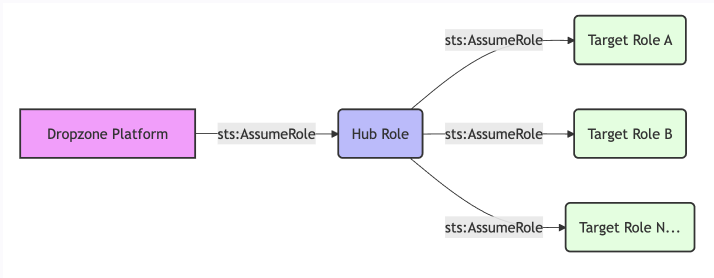
The role chaining pattern involves three main components:
* Dropzone Identity: The initial identity (AWS User/Role) that assumes the Hub Role
* Hub Role: A central role (e.g., in a Security or Management account) that trusts Dropzone and has permission to assume Target Roles
* Target Roles: Roles in your member/workload accounts that trust the Hub Role
The Role Chaining Pattern
### Create the Hub Role
* See the [Cross-Account Access via Console](/integrations/data/aws_data/aws-console_data.md) page for instructions on how to create a role in AWS
* You must create the Hub role (e.g. `DropzoneChainHub`) in your central account; this role acts as the gateway for Dropzone
* In the place of the "Trust Policy," input the following:
```json
{
"Version": "2012-10-17",
"Statement": [
{
"Effect": "Allow",
"Principal": {
"AWS": ""
},
"Action": "sts:AssumeRole",
"Condition": {
"StringEquals": {
"sts:ExternalId": ""
}
}
}
]
}
```
* Add the permissions policies listed in the [Cross-Account Access via Console](/integrations/data/aws_data/aws-console_data.md#add-a-custom-permission-policy) page
* Once you have created the role, add the following custom permission policy:
```json
{
"Version": "2012-10-17",
"Statement": [
{
"Effect": "Allow",
"Action": "sts:AssumeRole",
"Resource": "arn:aws:iam::*:role/DropzoneChainTarget"
}
]
}
```
{% hint style="info" %}
For the purposes of this documentation, the Target Account roles are named `DropzoneChainTarget` and the Hub Role is named `DropzoneChainHub`.
This policy allows the Hub role to assume the target roles in your member accounts. You can restrict the resource to specific role names or paths.
{% endhint %}
### Create the Target Roles
* See the [Cross-Account Access via Console](/integrations/data/aws_data/aws-console_data.md) page for instructions on how to create a role in AWS
* You must create a role (e.g. `DropzoneChainTarget`) in each member account you want Dropzone to access
* In the place of the "Trust Policy," input the following:
```json
{
"Version": "2012-10-17",
"Statement": [
{
"Effect": "Allow",
"Principal": {
"AWS": "arn:aws:iam:::role/DropzoneChainHub"
},
"Action": "sts:AssumeRole"
}
]
}
```
{% hint style="info" %}
This policy allows the Hub Role to assume the target role. Be sure to replace `` with the AWS Account ID where the Hub role resides.
{% endhint %}
* Add the permissions policies listed in the [Cross-Account Access via Console](/integrations/data/aws_data/aws-console_data.md#add-a-custom-permission-policy) page
## Enable the Dropzone Data Source
* Follow instructions in the [Amazon Web Services](/integrations/data/aws_data.md) overview page to enable the Data Source
* In the Hub Role ARN field, input the ARN of the Hub Role you configured earlier, e.g. `arn:aws:iam::936862572175:role/DropzoneChainHub`
* In the Role ARNs field, input the ARNs of the Target Roles you configured earlier, e.g. `arn:aws:iam::{account_id}:role/DropzoneChainTarget`
Once done, Dropzone will use the Hub role to discover and assume the Target role in any relevant AWS account during investigations.
If you have any errors contact our Customer Success team.