> For the complete documentation index, see [llms.txt](https://docs.dropzone.ai/llms.txt). Markdown versions of documentation pages are available by appending `.md` to page URLs; this page is available as [Markdown](https://docs.dropzone.ai/integrations/data/vision.md).
# Vision
{% hint style="info" %}
Vision is a tooling integration. Tooling Data Source integrations are used during investigations to improve analysis and in interactive chat to help answer questions. They are optional, but enabling more tooling integrations enhances Dropzone analysis.
{% endhint %}
The Dropzone platform integrates with [OpenAI GPT Vision](https://platform.openai.com/docs/guides/vision) to analyze images, for example extracting text, links, and QR codes.
## Enable Vision
The Vision integration does not require any API keys or credentials.
To enable the Data Source integration, do the following:
* Navigate to your Dropzone AI tenant home page e.g. https\://*mycompany*.dropzone.app
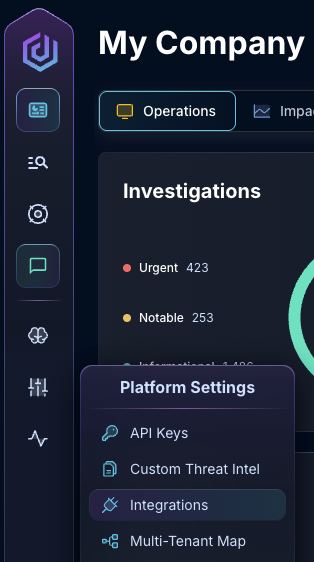
* In the left side bar, navigate to Platform Settings > Integrations
Integrations Dropdown
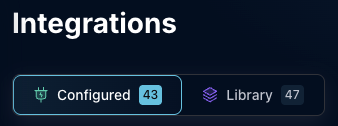
* Click "Configured"
Click Configured
* In the Search bar, search Vision, then click the kebab on the right
Select Vision
* Click "Enable data source" to enable Vision
Enable data source
If you have any errors contact our Customer Success team.