> For the complete documentation index, see [llms.txt](https://docs.dropzone.ai/llms.txt). Markdown versions of documentation pages are available by appending `.md` to page URLs; this page is available as [Markdown](https://docs.dropzone.ai/integrations/alert/wiz_alert.md).
# Wiz
## Wiz
The Dropzone AI platform integrates with Wiz to ingest security findings and enrich investigations with context from [Wiz](https://www.wiz.io/about) such as cloud configurations, vulnerabilities, and exposure data via webhook automation rules.
## Integrations Overview
To enable these integrations you will perform the following actions:
* Create an API Key (within Dropzone AI)
* Configure a webhook integration in Wiz
* Create a custom automation rule in Wiz
### Create an API Key
To create a Dropzone API key, do the following:
* Navigate to your Dropzone AI tenant home page e.g. https\://*mycompany*.dropzone.app
* In the left side bar, navigate to Platform Settings > API Keys
API Keys Dropdown
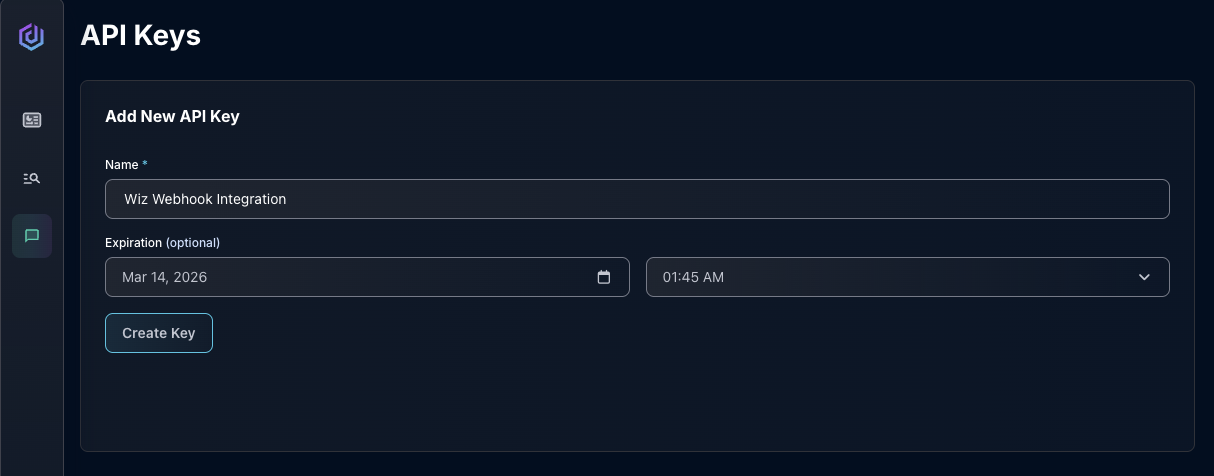
* In the "Add New API Key" section, name the API key something memorable, such as "Wiz Webhook Integration"
* If you want to assign an expiration date to the API Key, select your desired expiration date in the "Expiration" section
* Click "Create Key"
Create API Key
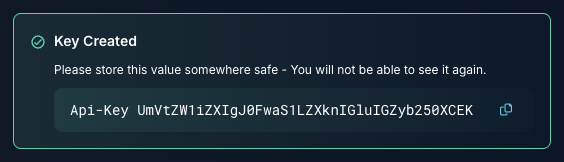
* Copy the value shown for use later in the Wiz UI
Copy the API Key
### Create a Wiz Webhook Integration
Follow instructions on Wiz's [documentation site](https://docs.wiz.io/wiz-docs/docs/dropzone-ai-webhook-integration) to create a Wiz Webhook integration, or contact your Wiz/Dropzone support representative.
In the URL section of your webhook integration, paste in your Dropzone webhook URL, e.g. https\:///app/api/v1/investigation/create. Use the API key you generated earlier as your API Key value.
### Create an Automation Rule
Contact your Wiz/Dropzone support representative for instructions on how to create an Automation Rule.
You must create an automation rule with the "Post Webhook" feature. In the "Request Body" section of your webhook, replace the default action template with the JSON below:
```
{
"schema_key": "wiz_webhook_detection",
"raw_alert_content": {
"trigger": {
"source": "{{triggerSource}}",
"type": "{{triggerType}}",
"ruleId": "{{ruleId}}",
"ruleName": "{{ruleName}}"
},
"id": "{{detection.id}}",
"threatId": "{{detection.issue.id}}",
"threatURL": {{#detection.issue.url}}"{{detection.issue.url}}"{{/detection.issue.url}}{{^detection.issue.url}}null{{/detection.issue.url}},
"title": "{{detection.rule.name}}",
"description": {{#detection.description}}"{{detection.description}}"{{/detection.description}}{{^detection.description}}null{{/detection.description}},
"severity": "{{detection.severity}}",
"createdAt": "{{detection.createdAt}}",
"tdrId": "{{detection.rule.id}}",
"tdrSource": "{{detection.rule.sourceType}}",
"mitreTactics": {{detection.rule.MITRETactics}}{{^detection.rule}}null{{/detection.rule}},
"mitreTechniques": {{detection.rule.MITRETechniques}}{{^detection.rule}}null{{/detection.rule}},
"cloudAccounts": {{detection.cloudAccounts}},
"cloudOrganizations": {{detection.cloudOrganizations}},
"timeframe": {
"start": "{{detection.startedAt}}",
"end": "{{detection.endedAt}}"
},
"actors": {{detection.actors}},
"primaryActor": {{#detection.primaryActor}}{{detection.primaryActor}}{{/detection.primaryActor}}{{^detection.primaryActor}}null{{/detection.primaryActor}},
"resources": {{detection.resources}},
"primaryResource": {{#detection.primaryResource}}{{detection.primaryResource}}{{/detection.primaryResource}}{{^detection.primaryResource}}null{{/detection.primaryResource}},
"triggeringEventsCount": {{detection.triggeringEventsCount}},
"triggeringEvents": {{detection.triggeringEvents}}
},
"force_reinvestigation": false
}
```
Once this step has been committed, Wiz will start sending its alerts directly to Dropzone.
If you have any errors contact our Customer Success team.