Stellar Cyber
The Dropzone AI Platform integrates with Stellar Cyber, an AI powered SecOps platform offering security solutions such as SIEM, Network Detection & Response (NDR), Identity Threat Detection & Response (ITDR), and User Behavior Entity Analytics (UEBA). Dropzone can perform analysis cases and alerts from the Stellar Cyber Connect API, and/or use Stellar Cyber data as part of investigation analysis.
Integration Overview
To enable these integrations you will perform the following actions:
Create an API token
Install the credentials into your Dropzone tenant
Select integration parameters, such as which indexes to search
Create an API key
Stellar Cyber requires an API key to enable. To create an API key with the necessary permissions, the user must have Root scope and Super Admin privileges.
If you have access to a user with Root scope and Super Admin privileges, do the following:
As a user with the Edit User privilege, log into your Stellar Cyber instance
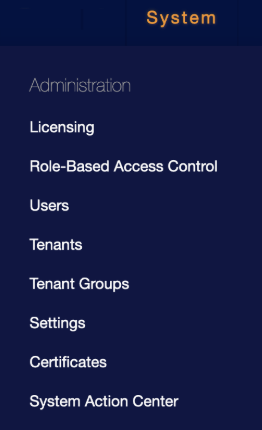
In the menu bar, click "System"

Navigate to Administration > Users

Under the Users tab, locate a user with Root scope and Super Admin privileges
Copy the email address for use later in the Dropzone UI where it is called "Client ID"

Under "Actions," click the Edit button

In the API Access section, click "Generate New Token"
Copy the token shown for use later in the Dropzone UI where it is called "Access Token"

If you do not already have a user with those privileges, do the following:
As a user with the Add User privilege, log into your Stellar Cyber instance
Navigate to System > Administration > Users
Under the Users tab, click "+ Create"

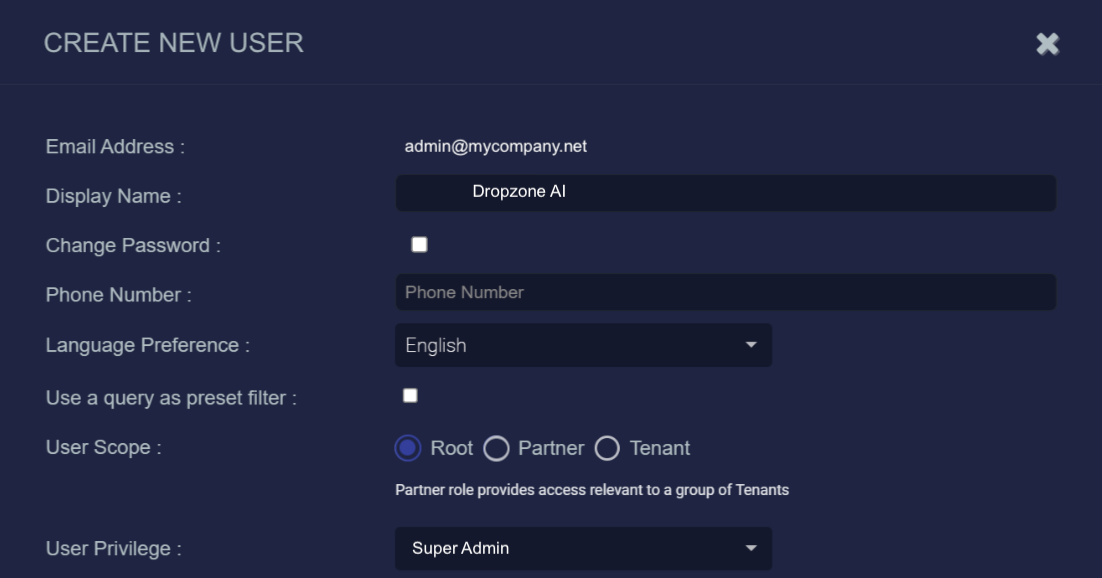
Input an email address for the User. Copy the value for use later in the Dropzone UI where it is called "Client ID"
Stellar Cyber requires a unique email address for all its users. We recommend creating a dedicated email address for this user, rather than using an existing company email.
Name the user something memorable, such as Dropzone AI
Create a password for the user
Next to "User Scope," click "Root"
Next to "User Privilege," select "Super Admin"

In the API Access section, click "Generate New Token"
Copy the token shown for use later in the Dropzone UI where it is called "API Key"
If you do not copy the token when the user is created, you will need to generate a new token.

Enable Stellar Cyber
To enable the Data Source integration, you'll need the following information:
URL
Your Stellar Cyber server hostname (e.g. https://myserver.stellarcyber.cloud)
Client ID
The email address of the Stellar Cyber user you created/used earlier
Access Token
The "Access Token" value you generated earlier
To enable the Data Source integration, do the following:
Navigate to your Dropzone AI tenant home page e.g. https://mycompany.dropzone.app
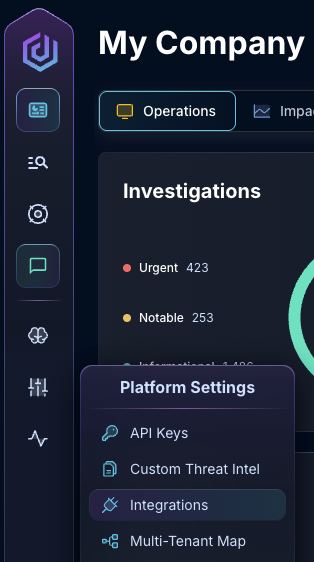
In the bottom left hand corner, navigate to Settings > Integrations

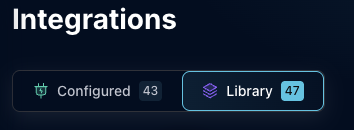
Click "Available"

In the Search bar, search Stellar Cyber, then click "Configure"

Under the Data Source heading, input the instance domain, user email address, and access token

Input an ElasticSearch Index Prefix
Under "Advanced ElasticSearch Request Timeout," input ___

Under "Enabled Stellar Cyber ElasticSearch Indexes," select the [indexes(https://docs.stellarcyber.ai/prod-docs/5.1.x/Common/Understanding-Indices.htm?Highlight=index) you want Dropzone to have access to

Click "Test & Save" to finish

If you have any errors or questions, engage your Dropzone AI support representative.
Last updated
Was this helpful?