> For the complete documentation index, see [llms.txt](https://docs.dropzone.ai/llms.txt). Markdown versions of documentation pages are available by appending `.md` to page URLs; this page is available as [Markdown](https://docs.dropzone.ai/integrations/data/reversinglabs.md).
# ReversingLabs
{% hint style="info" %}
ReversingLabs is a Threat Intelligence (TI) integration. TI Data Source integrations are used during investigations to improve analysis and in interactive chat to help answer questions. They are optional, but enabling more tooling integrations enhances Dropzone analysis.
{% endhint %}
The Dropzone AI Platform integrates with [ReversingLabs](https://www.reversinglabs.com/), a cybersecurity company specializing in software supply chain security. Dropzone looks up file hashes, domains, IPs, and URLs against Spectra Intelligence. Customer files are never uploaded.
## Enable ReversingLabs
To enable the Data Source integration, you'll need the following information:
| Dropzone Field | Source |
| -------------- | --------------------------------------------------------------------------------------- |
| User Name | The username of your ReversingLabs account in the form of a string, e.g. u/company/user |
| Password | The password associated with the aforementioned account |
To enable the Data Source integration, do the following:
* Navigate to your Dropzone AI tenant home page e.g. https\://*mycompany*.dropzone.app
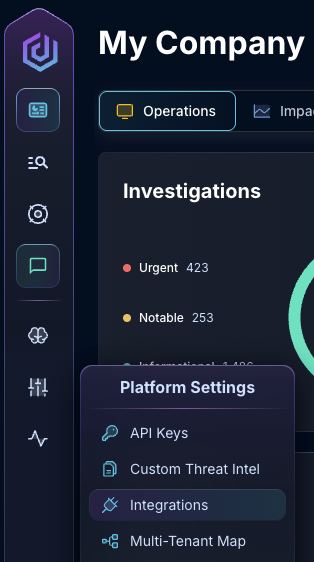
* In the left side bar, navigate to Platform Settings > Integrations
Integrations Dropdown
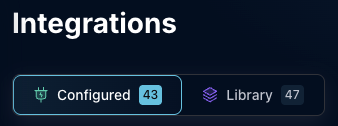
* Click "Configured"
Click Configured
* In the Search bar, search ReversingLabs and click it
Select ReversingLabs
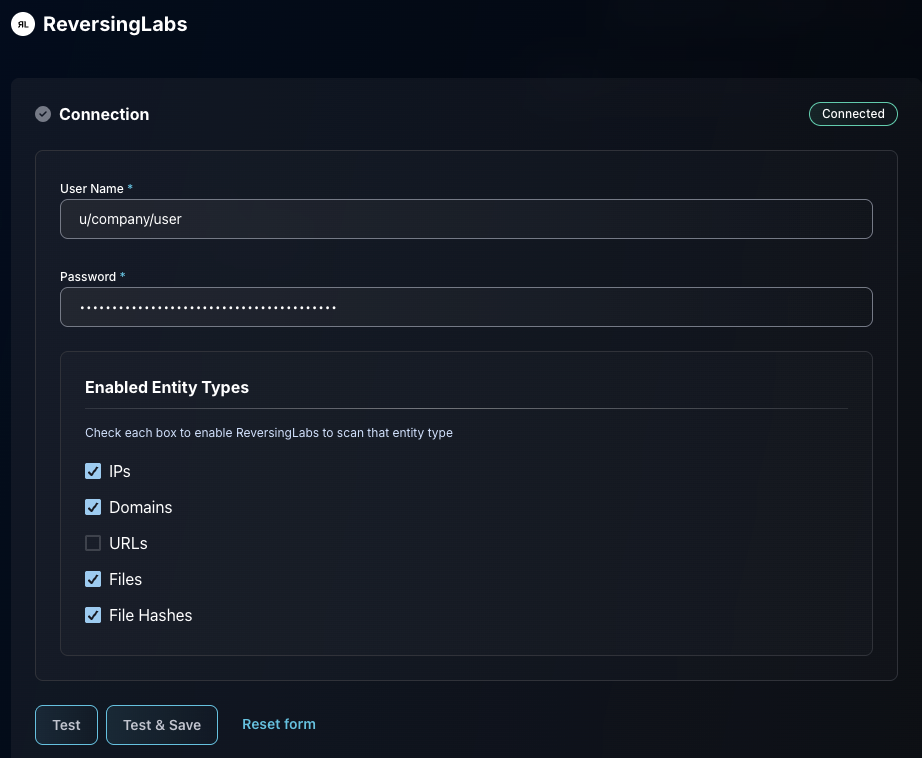
* Input the user name and password
* Under "Enabled Entity Types," select the entity types you want Dropzone to scan (IPs, domains, URLs, file hashes). Lookups are by hash and network indicator; files are not uploaded.
* Click "Test & Save" to finish
The ReversingLabs Data Source Configuration
If you have any errors contact our Customer Success team.