> For the complete documentation index, see [llms.txt](https://docs.dropzone.ai/llms.txt). Markdown versions of documentation pages are available by appending `.md` to page URLs; this page is available as [Markdown](https://docs.dropzone.ai/integrations/data/dzsecknowledgebase.md).
# Dropzone Security Knowledge Base
{% hint style="info" %}
Dropzone Security Knowledge Base is a Dropzone-provided Threat Intelligence (TI) data source. Dropzone provisions it automatically and leaves it enabled by default.
{% endhint %}
## What it does
Dropzone Security Knowledge Base connects investigations and interactive chat to Dropzone's internal baseline threat intelligence. Dropzone uses it to compare files and process activity against curated indicators of what is commonly seen in enterprise environments.
During investigations, this integration supports questions such as:
* Is this file hash associated with a known benign baseline executable (for example, a common Windows system binary)?
* How often has this file or process pairing been observed in baseline data?
* Does the parent process, path, or filename match typical patterns, or look anomalous relative to the baseline?
You will see evidence labeled Dropzone Security Knowledge Base on findings that used this source (for example, file reputation and file prevalence workflows). That label maps to this integration in Settings > Integrations.
## Why it matters
Third-party threat intelligence (such as ReversingLabs or MalwareBazaar) answers whether a hash is known malware or has a vendor reputation score. Dropzone Security Knowledge Base answers a different question: whether the file or process behavior looks typical for widely deployed software in real environments.
Together, vendor TI and Dropzone baseline context help analysts distinguish expected administrative or system activity from activity that is unusual even when a binary is not classified as malicious.
## What data it uses
Dropzone maintains an internal Dropzone Indicators threat intelligence collection (`dz_owned` data). Dropzone loads and updates this collection as part of the platform. It is not uploaded or managed by your team.
The baseline includes STIX indicators for:
* File hashes (MD5, SHA-256) mapped to common filenames and metadata
* Process context, including parent and related process relationships where available
* Prevalence signals, such as sighting counts, to show how commonly a hash or process pattern appears in baseline data
This is separate from customer-uploaded threat intelligence. If your organization uploads its own STIX feeds, those live in the Threat Intel workspace and surface in investigations as Custom Threat Intel, not as Dropzone Security Knowledge Base.
Dropzone may expand or refresh the baseline over time as part of normal platform updates. You do not need to take action when that happens.
## Enable Dropzone Security Knowledge Base
The Dropzone Security Knowledge Base integration does not require any API keys or credentials. Dropzone enables it by default.
To view the Data Source integration, or to re-enable it if it was disabled, do the following:
* Navigate to your Dropzone AI tenant home page e.g. https\://*mycompany*.dropzone.app
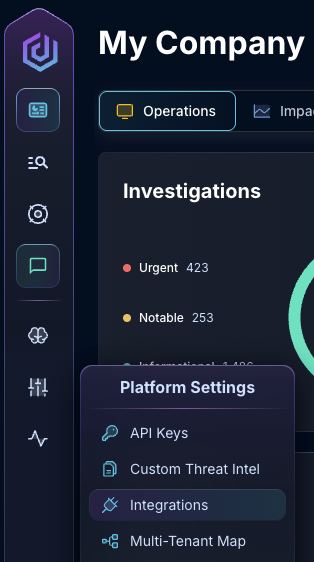
* In the left side bar, navigate to Platform Settings > Integrations
Integrations Dropdown
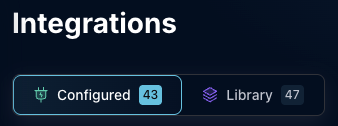
* Click "Configured"
Click Configured
* In the Search bar, search Dropzone Security Knowledge Base, then click the kebab on the right
Select Dropzone Security Knowledge Base
* If the data source is Disabled, click "Enable data source"
Enable data source
If you have any errors contact our Customer Success team.
When the integration is disabled, investigations and interactive chat will not query Dropzone Security Knowledge Base, and findings will not include that evidence. Leave it enabled so investigations can use baseline file and process context.
{% hint style="warning" %}
Do not confuse this integration with Custom Threat Intel. Custom Threat Intel is for your uploaded STIX collections. Dropzone Security Knowledge Base is for Dropzone-provided baseline data only.
{% endhint %}
## Where you see it in the product
| Location | What you see |
| --------------------------------- | ----------------------------------------------------------------------------------------------------------------------------------- |
| Investigation findings / evidence | Evidence type Dropzone Security Knowledge Base |
| Sources queried (finding header) | Chip labeled Dropzone Security Knowledge Base |
| Settings > Integrations | Dropzone Security Knowledge Base as a provided integration; status Connected when enabled, Disabled when an admin has turned it off |
## Related
* [Threat Intel workspace](https://gitlab.com/dropzone-ai/docs-gitbook/-/tree/main/docs.dropzone.ai/changelog/release-20260226.md) (customer collections and Dropzone-provided indicators)
* Other TI integrations (for example ReversingLabs, MalwareBazaar, VirusTotal) for vendor reputation and malware intelligence