> For the complete documentation index, see [llms.txt](https://docs.dropzone.ai/llms.txt). Markdown versions of documentation pages are available by appending `.md` to page URLs; this page is available as [Markdown](https://docs.dropzone.ai/integrations/data/cribl.md).

# Cribl

The Dropzone AI Platform integrates with [Cribl](https://cribl.io/), a software company that specializes in observability and data pipeline solutions, with tools for collecting, processing, and routing data from any source to any destination. Dropzone access data from Cribl to use in its threat analysis.

## Integration Overview

To enable these integrations you will perform the following actions:

* Identify your Organization ID and Workspace Name
* Generate API credentials
* Enable the data source

## Identify your Organization ID and Workspace Name

* Log in to your Cribl account
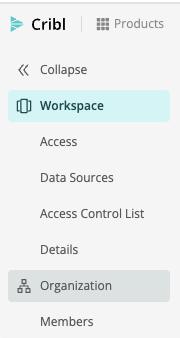
* In the left sidebar, click "Organization"

<figure><img src="https://435022081-files.gitbook.io/~/files/v0/b/gitbook-x-prod.appspot.com/o/spaces%2FmBVcKuiytGCsIDpL70BC%2Fuploads%2Fgit-blob-27b6e7c17dadb3cf397c61f8d7a236989c61f612%2Fcribl-1.png?alt=media" alt=""><figcaption></figcaption></figure>

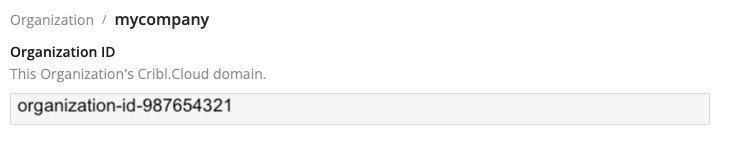
* Copy your organization ID for use later in the Dropzone UI where it is called "Organization ID"

<figure><img src="https://435022081-files.gitbook.io/~/files/v0/b/gitbook-x-prod.appspot.com/o/spaces%2FmBVcKuiytGCsIDpL70BC%2Fuploads%2Fgit-blob-212dda8a4d83f5ceae4c2ce2a503f5df18135c26%2Fcribl-2.png?alt=media" alt=""><figcaption><p>Copy the Organization ID</p></figcaption></figure>

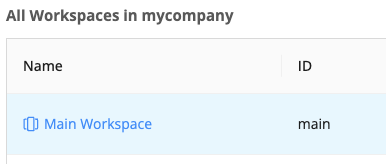
* In the top bar, click the Workspace icon

<figure><img src="https://435022081-files.gitbook.io/~/files/v0/b/gitbook-x-prod.appspot.com/o/spaces%2FmBVcKuiytGCsIDpL70BC%2Fuploads%2Fgit-blob-83cd609f920a094677a1514c4306aac32a401b54%2Fcribl-3.png?alt=media" alt=""><figcaption><p>Click the Workspace Icon</p></figcaption></figure>

* Select the Workspace you want Dropzone to have access to

<figure><img src="https://435022081-files.gitbook.io/~/files/v0/b/gitbook-x-prod.appspot.com/o/spaces%2FmBVcKuiytGCsIDpL70BC%2Fuploads%2Fgit-blob-6e0d68191c55fff164409dd0833997eb422d8e3b%2Fcribl-4.png?alt=media" alt=""><figcaption><p>Select your workspace</p></figcaption></figure>

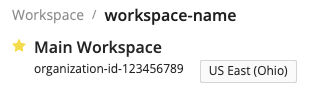
* Copy the Workspace Name for use later in the Dropzone UI where it is called "Workspace Name"

<figure><img src="https://435022081-files.gitbook.io/~/files/v0/b/gitbook-x-prod.appspot.com/o/spaces%2FmBVcKuiytGCsIDpL70BC%2Fuploads%2Fgit-blob-28294156f5df8d0237798229c6a4122c5ea1cf85%2Fcribl-5.png?alt=media" alt=""><figcaption></figcaption></figure>

## Generate API Credentials

Cribl requires an API Key to enable

Within the Workspace you want Dropzone to access, do the following:

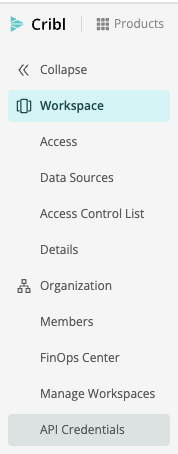
* In the left sidebar, navigate to Organization > API Credentials

<figure><img src="https://435022081-files.gitbook.io/~/files/v0/b/gitbook-x-prod.appspot.com/o/spaces%2FmBVcKuiytGCsIDpL70BC%2Fuploads%2Fgit-blob-3bde5f40700e778a48f936fb79163f58f02a5655%2Fcribl-6.png?alt=media" alt=""><figcaption></figcaption></figure>

* In the upper right, click "Add Credential"

<figure><img src="https://435022081-files.gitbook.io/~/files/v0/b/gitbook-x-prod.appspot.com/o/spaces%2FmBVcKuiytGCsIDpL70BC%2Fuploads%2Fgit-blob-21098a065dd843144e29d73475dd5ea93e931591%2Fcribl-7.png?alt=media" alt=""><figcaption></figcaption></figure>

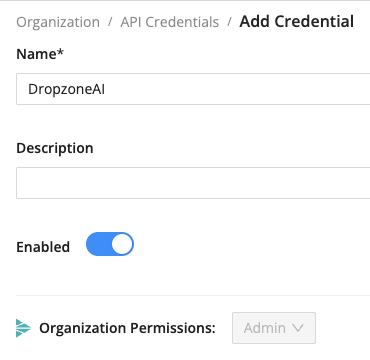
* Name the credential something memorable, such as "DropzoneAI"
* Next to "Organization Permissions," select "Admin"
* Click "Save"

<figure><img src="https://435022081-files.gitbook.io/~/files/v0/b/gitbook-x-prod.appspot.com/o/spaces%2FmBVcKuiytGCsIDpL70BC%2Fuploads%2Fgit-blob-34c822b2f5a9f7fa9b06320034588424757e281b%2Fcribl-8.png?alt=media" alt=""><figcaption><p>Create the API credentials</p></figcaption></figure>

* Copy the Client ID and Secret Value for use later in the Dropzone UI, where they are called "Client ID" and "Client Secret," respectively

<figure><img src="https://435022081-files.gitbook.io/~/files/v0/b/gitbook-x-prod.appspot.com/o/spaces%2FmBVcKuiytGCsIDpL70BC%2Fuploads%2Fgit-blob-0c9ab782efe204dca05105641c2ded965ffa92ad%2Fcribl-9.png?alt=media" alt=""><figcaption><p>Copy the API credentials</p></figcaption></figure>

## Enable Cribl

To enable the Data Source integration, you will need the following information:

| Dropzone Field  | Source                                         |
| --------------- | ---------------------------------------------- |
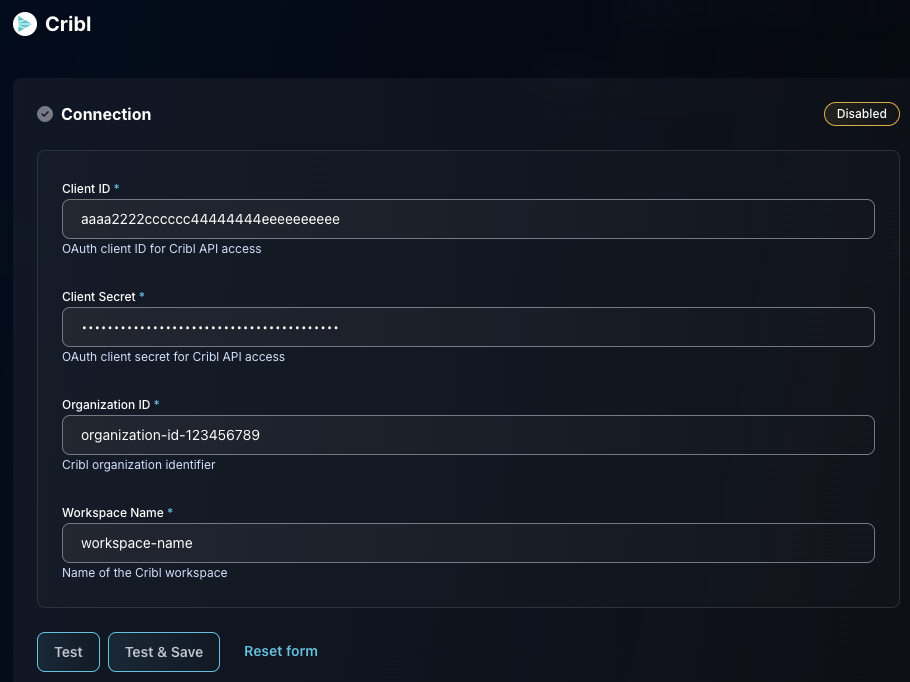
| Client ID       | The "Client ID" value you copied earlier       |
| Client Secret   | The "Client Secret" value you copied earlier   |
| Organization ID | The "Organization ID" value you copied earlier |
| Workspace Name  | The "Workspace Name" value you copied earlier  |

To enable the Data Source integration, do the following:

* Navigate to your Dropzone AI tenant home page e.g. https\://*mycompany*.dropzone.app
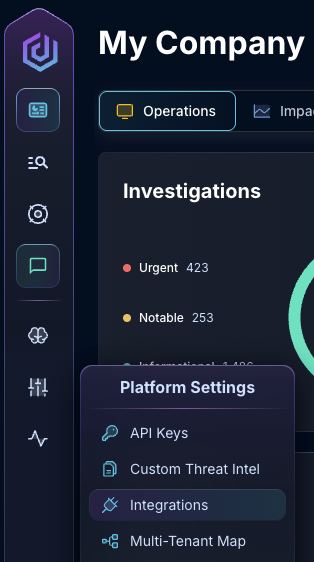
* In the bottom left hand corner, click Settings > Integrations

<figure><img src="https://435022081-files.gitbook.io/~/files/v0/b/gitbook-x-prod.appspot.com/o/spaces%2FmBVcKuiytGCsIDpL70BC%2Fuploads%2Fgit-blob-8c77435ef341f8180540e049f505d3390a27bbf4%2Fui-integrations-dropdown.png?alt=media" alt=""><figcaption><p>Integrations Dropdown</p></figcaption></figure>

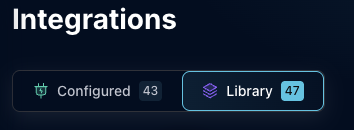
* Click "Library"

{% hint style="info" %}
If you have previously integrated this application, click "Configured"
{% endhint %}

<figure><img src="https://435022081-files.gitbook.io/~/files/v0/b/gitbook-x-prod.appspot.com/o/spaces%2FmBVcKuiytGCsIDpL70BC%2Fuploads%2Fgit-blob-7e038b4f51ee27d4cf4f1ac6f76c5ddae2bf29c5%2Fapp_system_integrations_library.png?alt=media" alt=""><figcaption><p>Click Library</p></figcaption></figure>

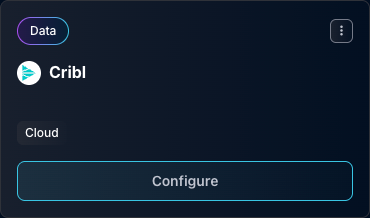
* In the Search bar, search Cribl, then click "Configure"

<figure><img src="https://435022081-files.gitbook.io/~/files/v0/b/gitbook-x-prod.appspot.com/o/spaces%2FmBVcKuiytGCsIDpL70BC%2Fuploads%2Fgit-blob-0ffdc129eb572d0ce09a4fd805bdf6e2d5f187f6%2Fapp_system_integrations_available_cribl.png?alt=media" alt=""><figcaption><p>The Cribl Data Tile</p></figcaption></figure>

* Input the Client ID, Client Secret, Organization ID, and Workspace Name
* Click "Test & Save" to finish

<figure><img src="https://435022081-files.gitbook.io/~/files/v0/b/gitbook-x-prod.appspot.com/o/spaces%2FmBVcKuiytGCsIDpL70BC%2Fuploads%2Fgit-blob-a3730f087b29f7a4b6f19822ec215ec4259971c1%2Fapp_system_integrations_available_cribl_config.png?alt=media" alt=""><figcaption><p>The Cribl Data Source Configuration</p></figcaption></figure>

If you have any errors engage your Dropzone AI support representative.