> For the complete documentation index, see [llms.txt](https://docs.dropzone.ai/llms.txt). Markdown versions of documentation pages are available by appending `.md` to page URLs; this page is available as [Markdown](https://docs.dropzone.ai/integrations/alert/rapid7-insight-idr_alert.md).
# Rapid7 Insight IDR
{% hint style="info" %}
Rapid7 Insight IDR is an SIEM integration. SIEM integrations are used to perform analysis of any SIEM generated alerts, and/or to use generated data as part of investigation analysis.
{% endhint %}
{% hint style="info" %}
This alert source integration is in **beta**. It is not visible in the Dropzone UI until it has been explicitly enabled for your tenant. Contact our Customer Success team to request enablement.
{% endhint %}
The Dropzone AI Platform integrates with [Rapid7 Insight IDR](https://www.rapid7.com/products/insightidr/), a cloud-native SIEM and XDR solution. Dropzone can poll InsightIDR investigations as alert sources, enrich them with associated alerts and evidence (Attacker Behavior Analytics and User Behavior Analytics), and run AI-driven investigations.
## Integrations Overview
To enable these integrations you will perform the following actions:
* Create an API key
* Locate your tenant region
* Install the credentials into your Dropzone tenant (Data Source and Alert Source)
* Select integration parameters
## Create an API Key
Rapid7 InsightIDR requires an API key from the [Insight platform API](https://help.rapid7.com/insightidr/en-us/api/v2/docs.html) to enable
{% hint style="info" %}
Rapid7 has two types of API Keys: Organization Keys and User Keys. Organization Keys have access to all company data, while User Keys inherit the permissions of the user.
To limit Dropzone's scope, you may wish to create a User Key with Read-only privileges limited to certain projects. Alternatively, to improve Dropzone's analysis, you may wish to use an Organization Key.
See Rapid7's [Role-Based Access Control documentation](https://docs.rapid7.com/insight/manage-users/) for more information.
{% endhint %}
To obtain an Organization API Key, do the following:
* As a platform administrator, log into your Rapid7 Command Platform
* In the left menu, click "Administration"
* Click "API Key management"
* Click "Admin API Keys," then navigate to "Organization Keys"
* Click "New Admin Key"
* Select "Organization Admin Key"
* Select your organization
* Name the key something memorable, such as Dropzone AI
* Click "Generate"
* Copy the key value shown for use later in the Dropzone UI, where it is called API Key
To obtain a User API key, do the following:
* In the left menu of the Rapid7 Command Platform Home page, click "Administration"
* Click "API Key Management"
* Click "User Key"
* Click "New user Key"
* Select your organization
* Name the key something memorable, such as Dropzone AI
* Click "Generate"
* Copy the key value shown for use later in the Dropzone UI, where it is called API Key
## Identify your data region
Dropzone needs the region code for your InsightIDR data storage region (for example `us`, not a full hostname).
To obtain your data region, do one of the following:
* Open any Rapid7 product you have access to (for example InsightIDR)
* Locate the browser URL subdomain prefix before `.idr.insight.rapid7.com` (or a similar Rapid7 product hostname)
* Enter that prefix in Dropzone as the Region value
* For example, if your URL is `https://us.idr.insight.rapid7.com`, enter `us` in Dropzone.
For more detail, see Rapid7's [Check your data region](https://docs.rapid7.com/insight/navigate-the-insight-platform/#check-your-data-region) documentation.
* In the Rapid7 Command Platform, navigate to Administration > Settings > Organization Settings
* Locate your Data Storage Region (aka the display name for your tenant)
* Map that label to the Region value for Dropzone using the table below
| Data Storage Region (Rapid7 UI) | Dropzone Region value |
| ------------------------------- | --------------------- |
| United States - 1 | `us` |
| United States - 2 | `us2` |
| Canada | `ca` |
| Europe | `eu` |
| Australia | `au` |
| Japan / Asia-Pacific | `ap` |
For the full list of supported regions and API base URLs, see Rapid7's [Supported regions](https://docs.rapid7.com/insight/product-apis/#supported-regions) documentation.
## Enable Rapid7 Insight IDR
To enable the Alert Source integration, you'll need the following information:
| Dropzone Field | Source |
| -------------- | ----------------------------------------------------------------------------------------------------------- |
| API Key | The API Key you generated earlier |
| Region | Your Rapid7 data storage region, typically visible in your InsightIDR URL, e.g. *us*.api.insight.rapid7.com |
To enable the Alert Source integration, do the following:
* Navigate to your Dropzone AI tenant home page e.g. https\://*mycompany*.dropzone.app
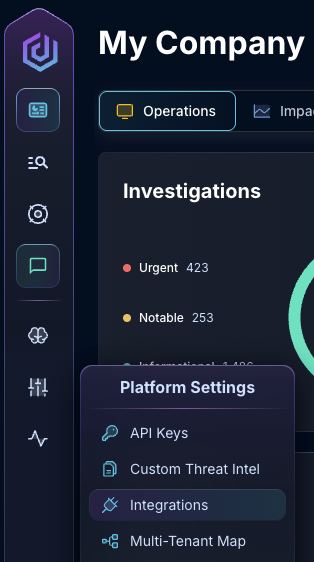
* In the left side bar, navigate to Platform Settings > Integrations
Integrations Dropdown
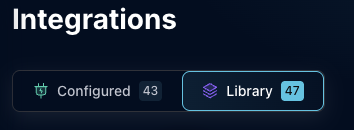
* Click "Library"
{% hint style="info" %}
If you have previously integrated this application, click "Configured"
{% endhint %}
Click Library
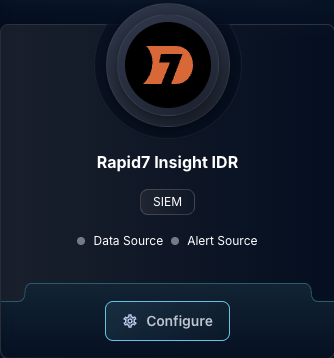
* In the Search bar, search Rapid7 Insight IDR, then click "Configure"
The Rapid7 Insight IDR Tile
* Input the API Key and Region
* Click "Test & Save" to finish
After saving, Dropzone will poll InsightIDR for new investigations in the configured time window and filters, and create investigations for each.
If you have any errors contact our Customer Success team.
### Troubleshooting
When you save or test the data source, Dropzone verifies connectivity by listing log sets from the Log Search API. A wrong Region or API key can produce an error like:
```
test_integration_connection() failed: Rapid7 connection test failed: could not list log sets. Verify the API key and region.
```
If you experience any errors, do the following:
* Confirm the Region matches your Rapid7 URL prefix or the Organization Settings table (enter `us`, not `us.api.insight.rapid7.com` or `us.rest.logs.insight.rapid7.com`)
* Re-open InsightIDR and verify the subdomain prefix (for example `us2` vs `us`)
* If Region is correct, verify the API key is an organization key with InsightIDR access and was copied without extra spaces
If both Region and API key look correct, engage our Customer Success team.