> For the complete documentation index, see [llms.txt](https://docs.dropzone.ai/llms.txt). Markdown versions of documentation pages are available by appending `.md` to page URLs; this page is available as [Markdown](https://docs.dropzone.ai/dropzone-101/terms-and-defs/alert-sources.md).
# Alert Sources
The Dropzone platform creates Investigations based on alerts that it receives via connected customer systems, for example cloud native alerting, EDR, workforce solutions, and SIEM.
Common Alert Sources include AWS GuardDuty, CrowdStrike, Microsoft Defender, and Splunk.
Some typical features of alert sources:
* Require API-access to your corporate systems, such as API keys, or sharing your resources with a customer-specific Dropzone service account
* May have filtering to investigate only some portion of available alerts, such as only HIGH or CRITICAL
* Can "backfill" alerts from before you enabled the Alert source to capture and investigate historical alerts
* Dropzone can "write back" to some Alert sources, such as select ticketing systems
## Configuration Options
Alert sources have a number of common configuration options:
| Type | Purpose | Examples |
| -------------------------- | ---------------------------------------------------------------------------------- | ----------------------------------------------------- |
| API parameters and secrets | Access credentials and configuration used by Dropzone authenticate to service APIs | URL endpoints, Client IDs, Client secrets, API tokens |
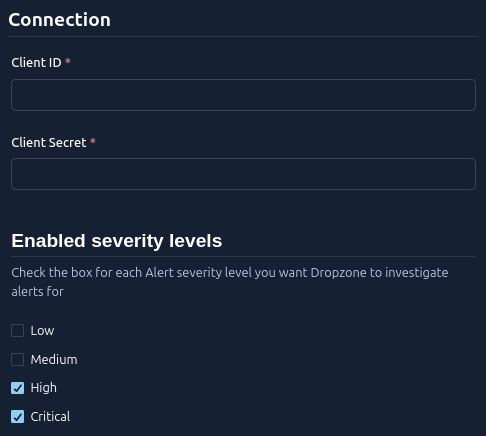
| Ingest filters | Select which types of events you want to investigate | High and Critical alerts only |
| Ingest frequency | How often the source is polled for more actionable events | 60 seconds |
Each integration documentation page will go into details about which values you'll need and how to find them.
An example Alert Source configuration with severity selector
## Backfilling Alerts
When you enable an Alert Source it starts looking for new alerts immediately. You may also wish to "backfill" to pull in historical alerts for processing.
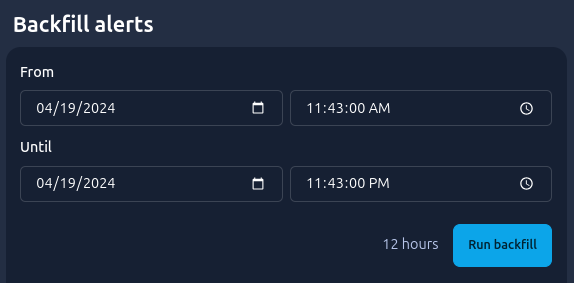
On all Alert Source configuration pages, after the configuration section, you'll find "Backfill alerts":
Backfill Time Selection
Simply pick a time range you wish to pull for historical alerts and hit "Save".
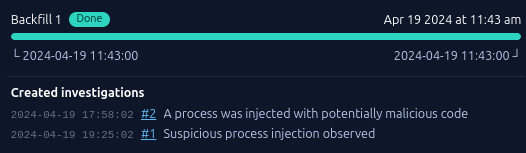
Instantly a new backfill progress section will appear and you can watch:
Backfill Time Complete
## Alert Tracking
To obtain a complete view of what happens to your alerts, you can use [Raw Alert Tracking](https://gitlab.com/dropzone-ai/docs-gitbook/-/tree/main/docs.dropzone.ai/dropzone-101/terms-and-defs/raw-alert-tracking.md). This feature allows you to see a record of every alert you've received, any errors that may have occurred during ingestion, and their ultimate outcome (typically an [Investigation](https://gitlab.com/dropzone-ai/docs-gitbook/-/tree/main/docs.dropzone.ai/dropzone-101/terms-and-defs/investigations.md)). Enabling it can significantly help with day-to-day triage and troubleshooting.